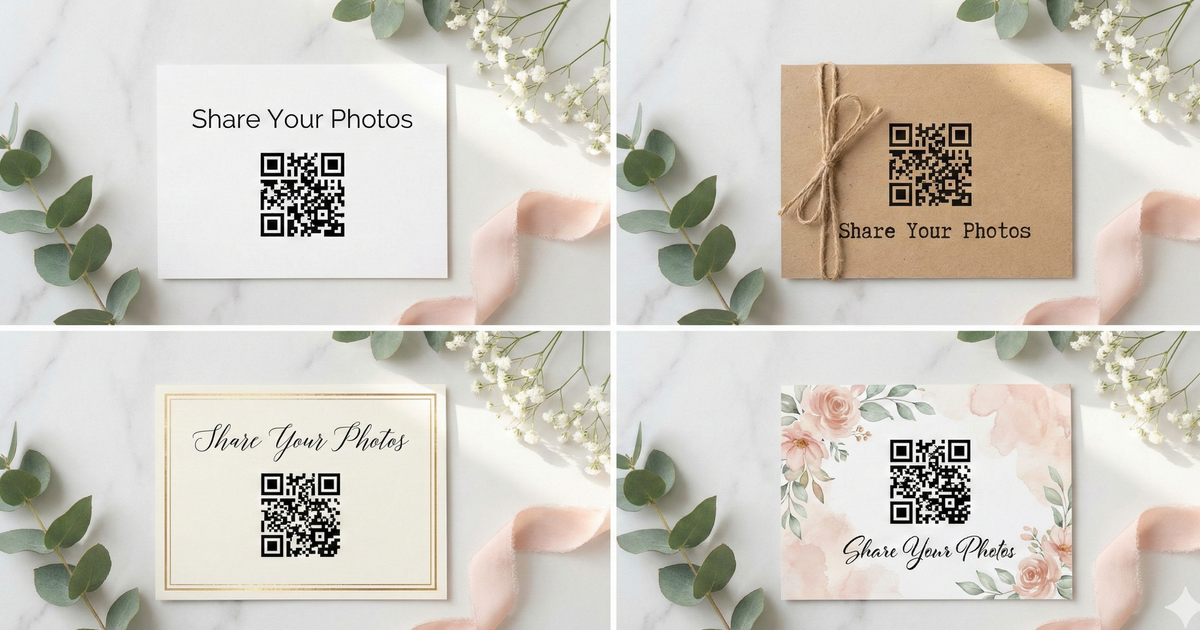
Your QR code table card is one of the most-seen items at your reception. Every guest, at every table, will look at it. So it should match your wedding style -- not look like a tech printout from the office.
Here are four design approaches that make your photo sharing card feel like part of the decor, not an afterthought.
How a QR Code Table Card Works
The idea is simple. You create an event page, get a QR code, and put it on a beautiful card. Place one on each table. When guests want to share a photo, they scan the code with their phone camera, select their photos, and upload. No app, no account, no group text.
The card is the bridge between your wedding vision and effortless photo collection. It's the thing that turns "I should send you that photo sometime" into "done, uploaded, you have it." So let's make it look as good as the rest of your reception.
Style 1: Modern Minimalist
Clean Lines, Maximum Impact
- Card stock: Clean white or off-white, heavy weight
- Typography: Black or dark gray text, sans-serif font (think Montserrat or Helvetica)
- Border: Simple thin border or no border at all
- QR code: Centered with plenty of white space around it
- Wording: "Share Your Photos" in small, clean text
- Best for: Contemporary, urban, or minimalist weddings
Print tip: Use heavy cardstock (110lb+) with a matte finish. The weight of the paper does the talking when the design is this simple.
Style 2: Rustic & Natural
Warm Textures, Organic Feel
- Card stock: Kraft paper or brown cardstock
- Accent: Twine or raffia wrapped around the card or tied at the top
- Typography: Handwritten-style fonts (like Sacramento or Dancing Script)
- QR code: Printed on a white label for scannability, then adhered to the kraft card
- Wording: "Scan Our Wedding QR" or "Capture the Love"
- Best for: Barn weddings, outdoor venues, farmhouse themes
Print tip: Print on actual kraft cardstock -- it holds QR codes well as long as the paper isn't too dark. If the kraft color is deep brown, print the QR on white and layer it on top.
Style 3: Classic Elegant
Timeless Sophistication
- Card stock: Cream or ivory with a gold foil border
- Typography: Serif fonts (like Playfair Display or Cormorant Garamond)
- Accents: Gold, rose gold, or silver details
- QR code: Framed in a thin decorative border
- Wording: "We Joyfully Wed -- Scan Below" or "Kindly Share Your Photos"
- Best for: Black tie, ballroom, traditional weddings
Print tip: Consider foil stamping for the border if your budget allows. Or fake the look by layering metallic cardstock behind a slightly smaller white card.
Style 4: Boho & Whimsical
Free-Spirited and Artful
- Card stock: Soft, textured paper with a natural feel
- Accents: Watercolor floral elements around the edges
- Typography: Mix of script and handwritten fonts
- QR code: Integrated naturally into the floral layout
- Wording: "Memories & Moments -- Scan to Share" or something fun and casual
- Best for: Garden parties, bohemian themes, outdoor ceremonies
Print tip: Watercolor effects print best on matte paper. Avoid glossy finishes -- they'll make the soft watercolor look harsh.
Ready to create your table card?
Get your QR code in 2 minutes, then design your card in Canva, Vistaprint, or any design tool you like.
Create Your Event PageDesign Tips That Apply to All Styles
-
1
QR code size matters
Make it at least 1 inch square. Bigger is always easier to scan, especially in dim reception lighting. Aim for 1.5 inches if you have the space.
-
2
Test before you print 100 copies
Print one card and scan it with your phone. Try it in different lighting. If it works on one test print, you're good to go for the full run.
-
3
Contrast is everything
Your QR code should be dark on a light background. Black on white is ideal. Avoid placing the QR on colored or textured backgrounds -- that's where scanning fails.
-
4
Choose the right card size
4x6" or 5x7" cards work best. They're visible from across the table without taking up too much space next to the centerpiece.
-
5
Print more than you think you need
One card per table, plus extras for the bar, photo booth area, restrooms, and the entrance. Guests are more likely to scan when the code is right in front of them.
Where to Get Your Cards Printed
You don't need a graphic designer or a big budget to make great-looking cards. Here are your best options:
- Design in Canva (free): Canva has tons of wedding card templates. Drop in your QR code image, customize the text and colors, and export as a PDF ready for printing.
- Print at home: If you have a decent printer and cardstock, this is the fastest and cheapest route. Great for last-minute changes too.
- Vistaprint, Moo, or Zazzle: Upload your design for professional-quality printing with options like foil, thick cardstock, and rounded corners.
- Local print shop: Perfect if you need same-day turnaround or want to see a proof in person before committing to a full order.
Wording Ideas for Your Card
Not sure what to write? Keep it short. The QR code does the heavy lifting -- your text just needs to tell guests what happens when they scan. Here are some options:
- "Share Your Photos With Us"
- "We'd Love to See Your Photos -- Scan to Upload"
- "Point. Scan. Share."
- "Help Us Capture Every Moment"
- "Don't Let Your Photos Stay on Your Phone"
Keep It Simple
The best-performing cards use five words or fewer above the QR code. Guests don't need a paragraph of instructions -- they just need to know that scanning means sharing photos.
Frequently Asked Questions
Can I design the card myself?
Yes. Canva is free and has hundreds of wedding-themed templates. Just add your QR code image to any template, adjust the text, and you're done. No design experience needed.
Will the QR code still work if I resize it?
Yes, as long as it's at least 1 inch square and not blurry. QR codes are designed to be resized. Just make sure you're scaling the image proportionally and always print a test copy to scan before ordering your full batch.
Should I include instructions on the card?
Keep it minimal. Something like "Scan with your phone camera to share photos" is plenty. Most people know how QR codes work now, and a cluttered card with too many instructions looks less elegant.
How do I get my QR code?
Create an event page at sendittoyou.com/event and your QR code is generated automatically. Download the image and drop it into your card design. The whole process takes about 2 minutes.
Make It Beautiful, Make It Easy
Your table card is the first thing guests see when they sit down at the reception. It's part of your tablescape, part of your decor, part of the experience you've spent months planning.
So give it 20 minutes of design time. Match it to your style. Print it on nice paper. The photos you'll collect from every table, every guest, every moment are worth it.
Get your QR code and start designing
Create your event page in minutes and download your QR code instantly.
Create Your Event Page